
Job management and compliance software for UK electrical, fire protection and life safety, and security contractors

Quote it. Schedule it. Test it. Certify it. Invoice it. One app.

Quotes, scheduling and an offline field app. Certificates laid out to BS 7671 and BS 5839, defects that go straight into a quote, invoicing with Xero, RAMS, drawings and a QR log book for every site. No per-certificate fees. No contract.

Lite £35, Office £65, Design £95 per seat per month + VAT · Early adopters keep their price for three years · No contract

Compliar keeps the records. How each certificate is filled in stays with your competent engineer and your scheme.

  • Fire, electrical and security under one login
  • Over 100 certificate and form templates, included with every seat
  • Field app in the phone's browser: no app store, works offline
  • Built and run in the UK by someone who still works in the trade
The whole operation

Eight stages of every job. One app does them all.

Most contractors run on a drawing package, a quoting tool, a spreadsheet for the calendar, a certificate app, an accounts package and a drawer of paper log books. Compliar is all of them, from the first drawing to the handover pack, with every record kept against the site it belongs to.

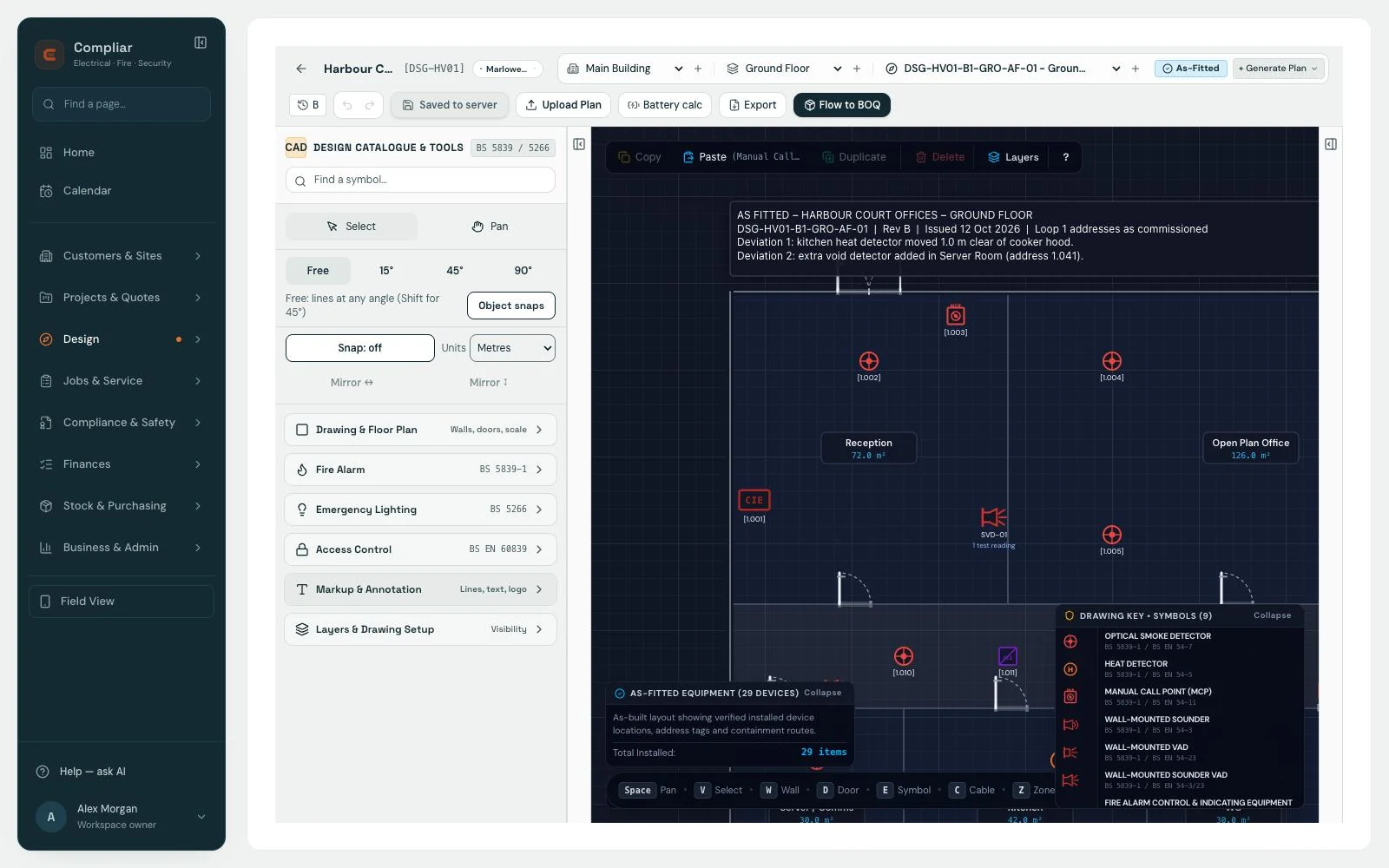
Compliar design editor showing a fire alarm floor plan with device symbols, addresses and a drawing key
Design the job Lay out the system on the floor plan, then take the device counts and cable runs off the drawing into the quote. The same drawing becomes the zone plan and the as-fitted record.
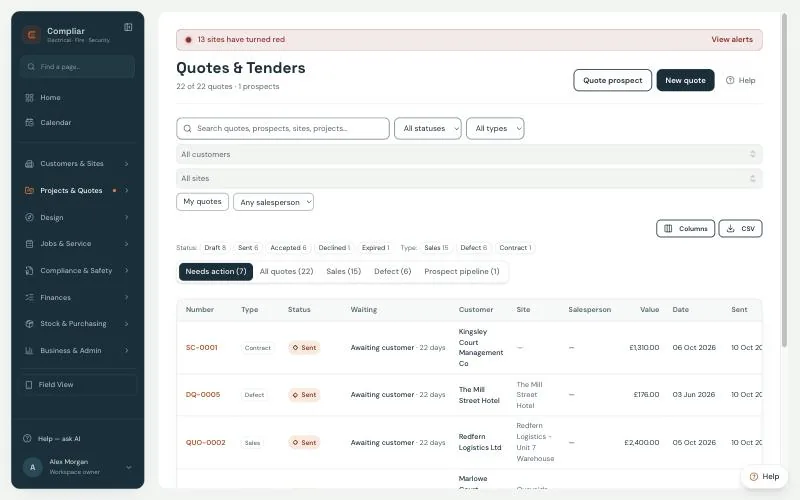
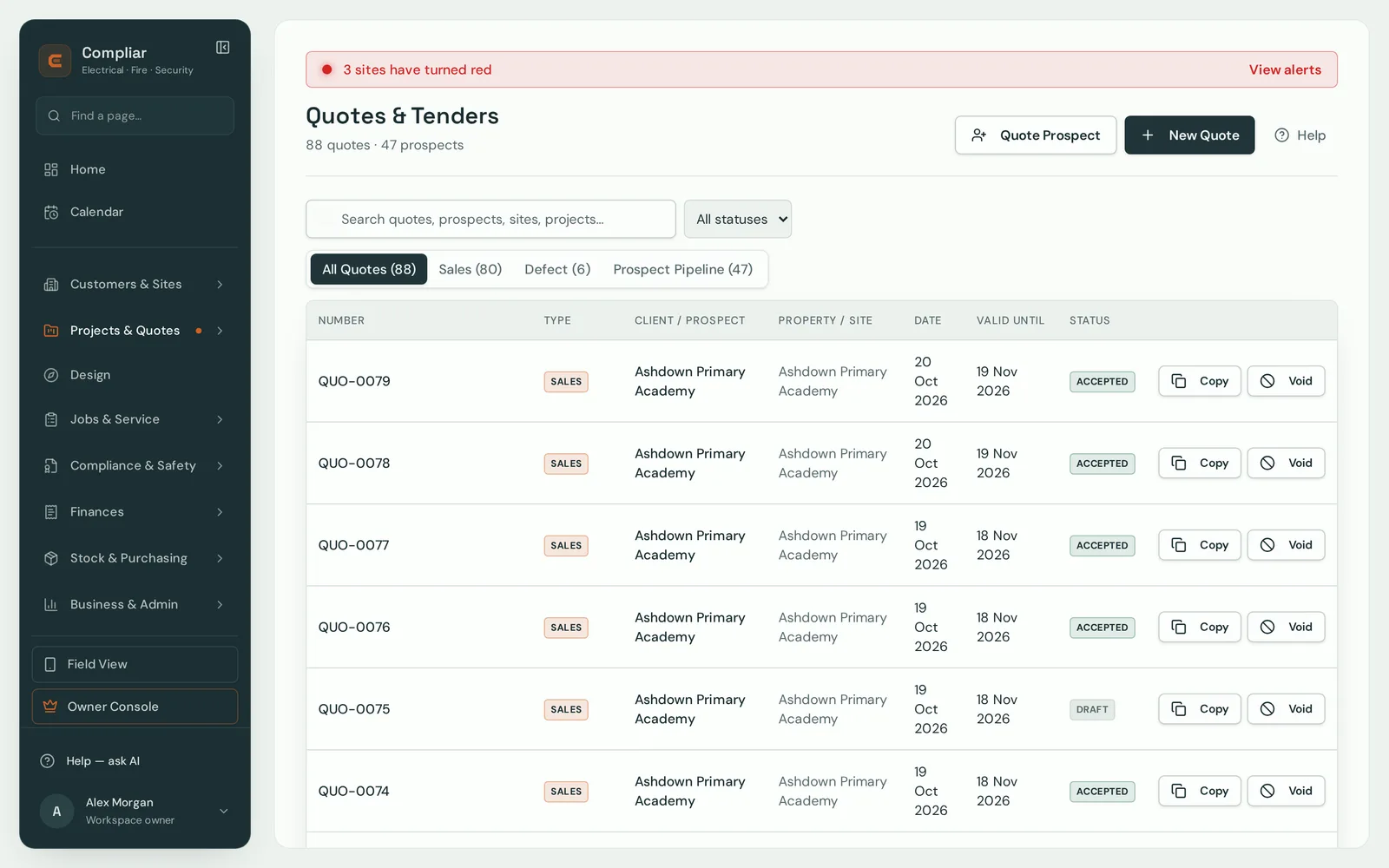
Compliar Quotes and Tenders list on sample data with status and type filters and tabs for Needs action, All quotes, Sales, Defect and Prospect pipeline
Win the work Sales quotes, defect quotes and project tenders priced area by area, each numbered separately. The quote goes out by email, you see when it has been opened, and the customer approves it from a link in the email.
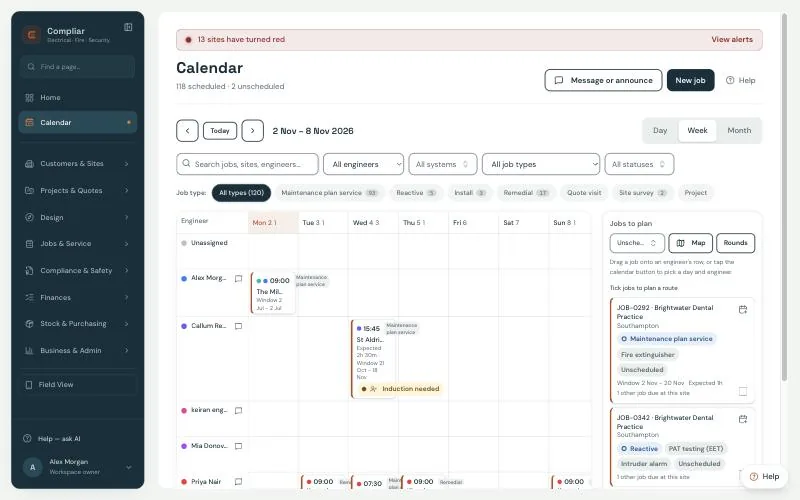
Compliar calendar week view on sample data with engineers in rows, job type filters and a Jobs to plan list with Map and Rounds buttons on the right
Plan the work Maintenance plans generate the routine visits. The calendar shows them by engineer, and the Jobs to plan list has Map and Rounds buttons, so you tick the jobs, plan the route and drag them onto a day.
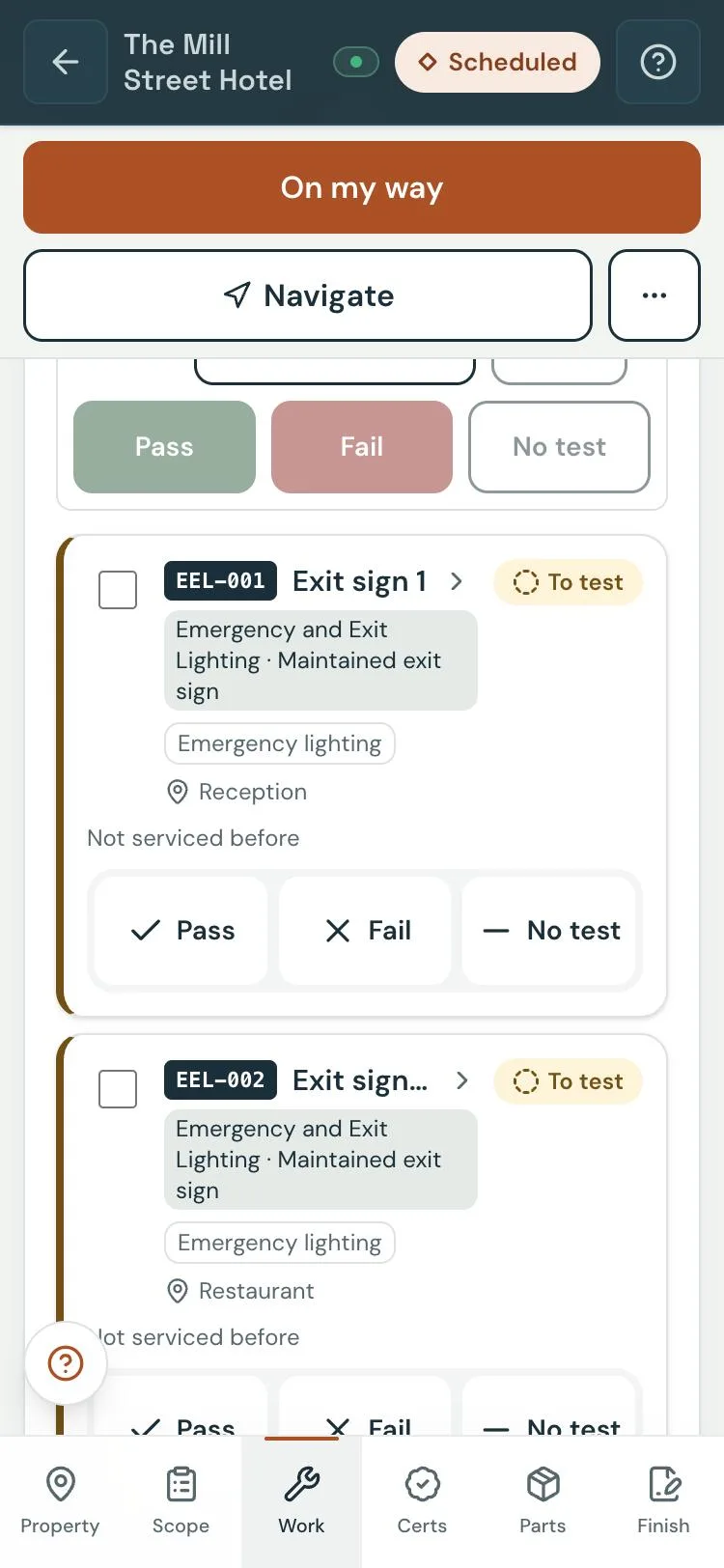
Compliar field app on a phone showing the asset testing list for an emergency lighting job, with Pass, Fail and No test buttons for each exit sign
Do the work The engineer works down the asset list with Pass, Fail or No test, logs parts and time, signs the RAMS and finishes the job, all in the phone's browser with no signal. It syncs when the signal comes back.
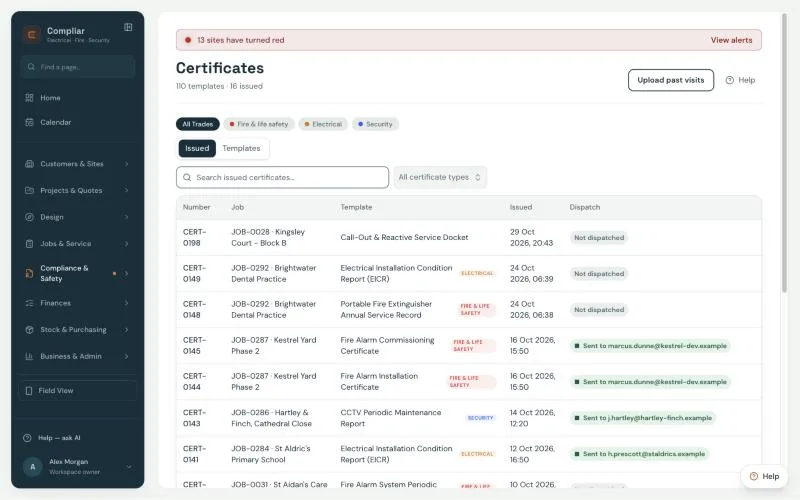
Compliar certificates list on sample data showing issued fire, electrical and security certificates by job, template, issue date and dispatch status
Prove the work Certificates for every discipline you work in, issued from the visit and held against the site. An issued certificate is never deleted; an edit needs a reason, and the reason is logged.
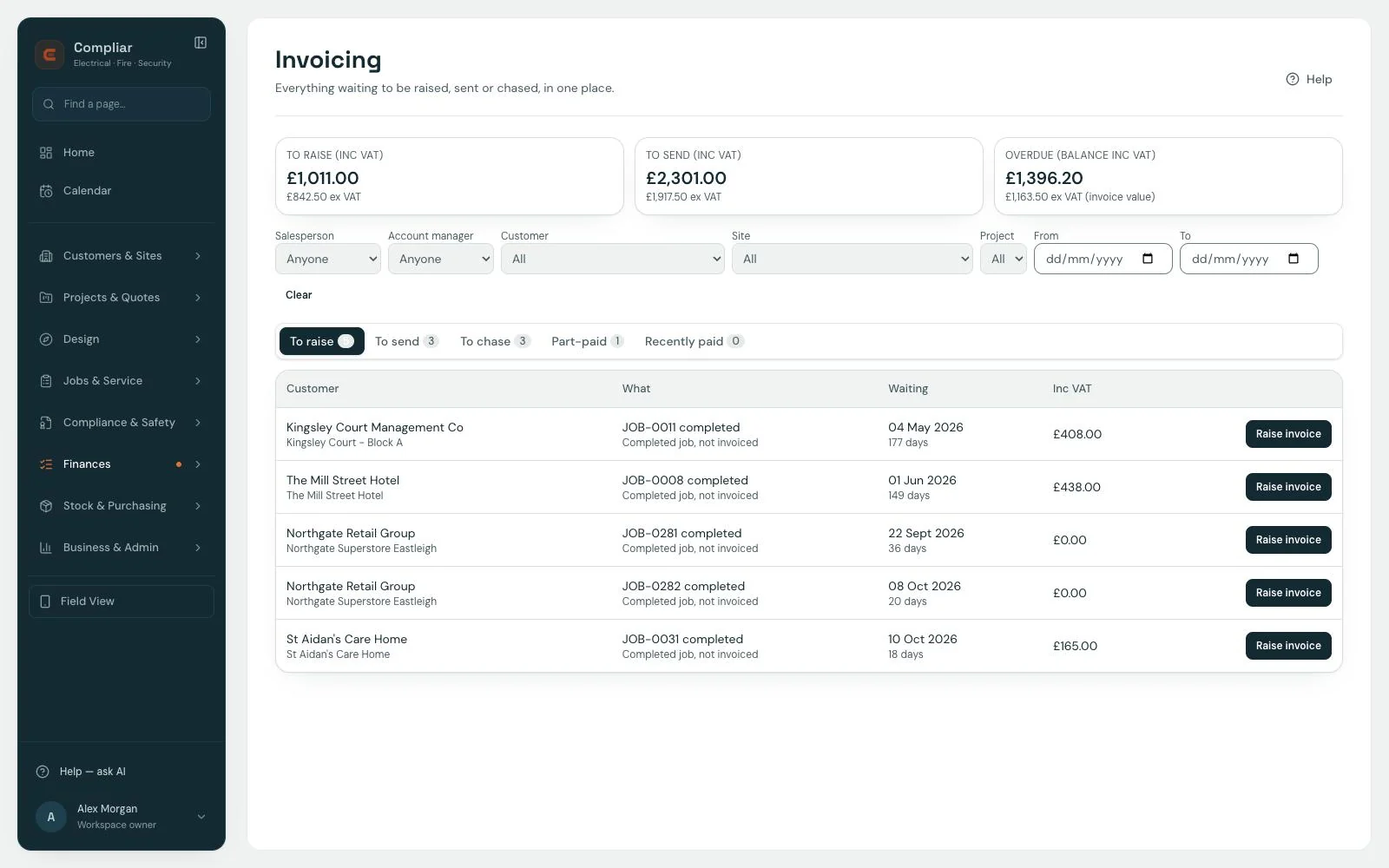
Compliar invoicing hub on sample data with amounts to raise, send and chase, and a list of completed jobs waiting to be invoiced
Get paid One hub for everything to raise, send and chase. Sending an invoice creates it in Xero, and a payment recorded in Xero marks it paid here. CIS on the labour share and retention held back are worked out on the invoice.
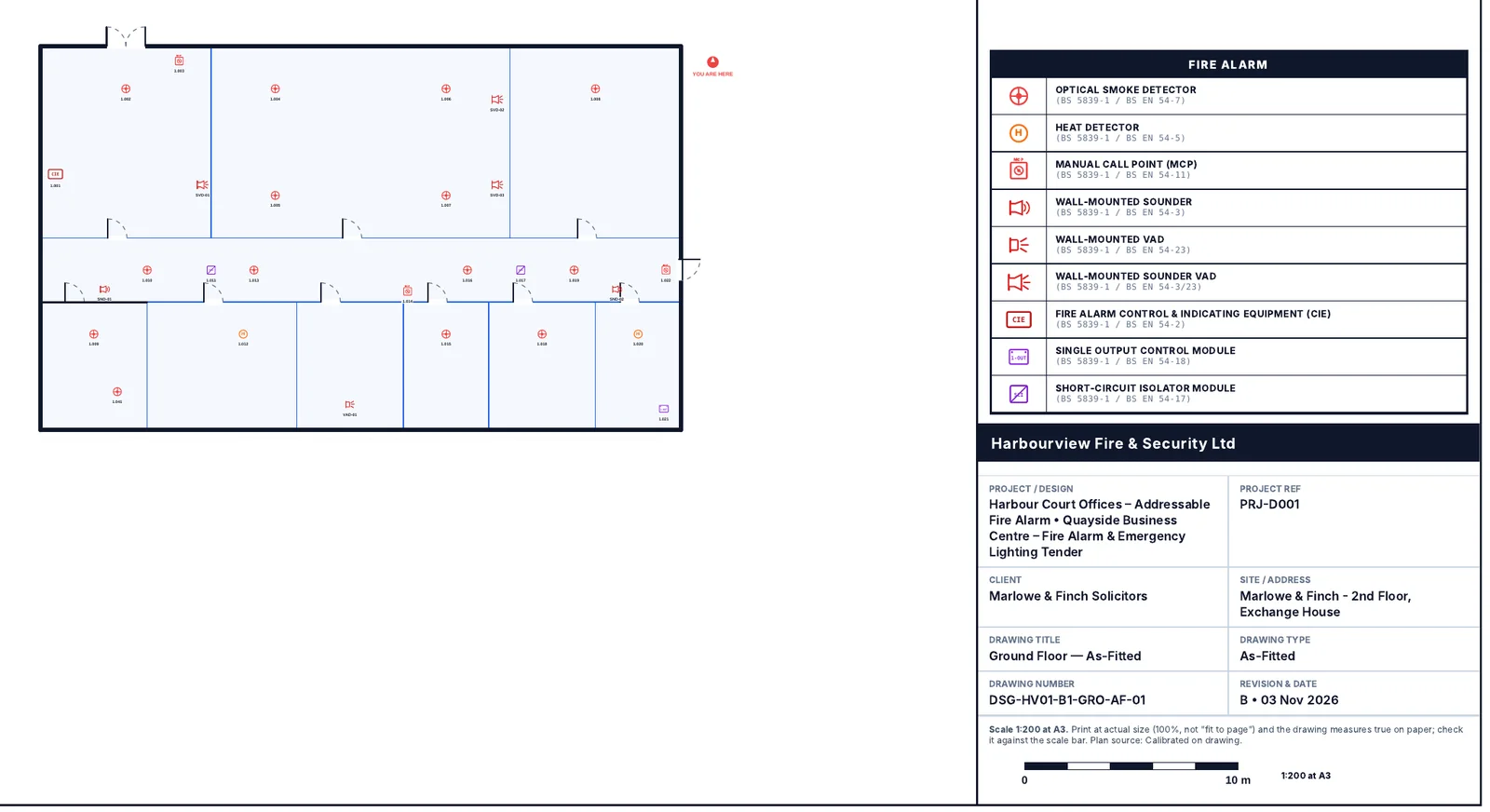
Compliar as-fitted drawing from a handover pack, a fire alarm floor plan with device symbols and a drawing key
Hand it over Build the handover (O&M) pack from the job: certificates, completion report, asset test report, drawings, manufacturer data sheets and the equipment schedule, ready to send to the customer.
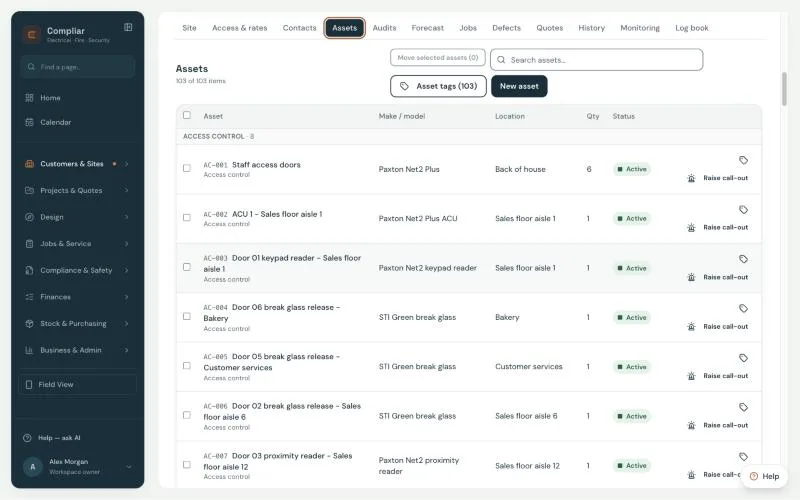
Compliar site asset register on sample data listing access control assets with make and model, location, quantity and status
Keep the record Every site holds its asset register, defects, certificates and history. Customers see their own certificates, defects and equipment in the portal, and the QR log book on the panel keeps the weekly tests.

All screens are the app on the Harbourview sample company. Tap any screen to view it full size.

One job, start to finish

From the first call to the invoice, nothing is typed twice.

Eight real screens from the app, in the order the work happens. The enquiry becomes a quote, the site's assets are registered, the engineer tests them and logs a defect on the phone, the certificate is issued against the site, the defect is quoted and the invoice is raised. Book a demo and Keiran walks through the same flow on your own sites.

Compliar Quotes and Tenders list on sample data with sales, defect and project quotes, status filters and values
1. Enquiry to quote The enquiry is raised as a quote. Sales, defect and project quotes are numbered separately, and the customer can approve from a link in the email.
Compliar site asset register on sample data listing access control assets with make and model, location, quantity and status
2. Site and asset register Every device on the site is an asset with its location, make and model, and its own test history.
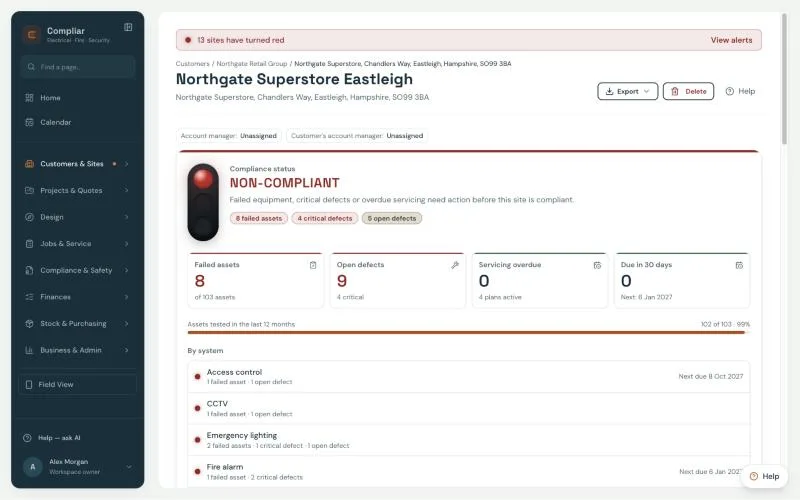
Compliar site page on sample data showing a red compliance status with failed assets, open defects, servicing overdue and due in 30 days, broken down by system
3. Compliance status Failed assets, critical defects and overdue servicing turn the site red, by system, so the office sees what needs action before the customer asks.
4. Test assets on the phone The engineer works down the asset list with Pass, Fail or No test per device, with or without signal. A device never tested shows as not tested, not as a pass.
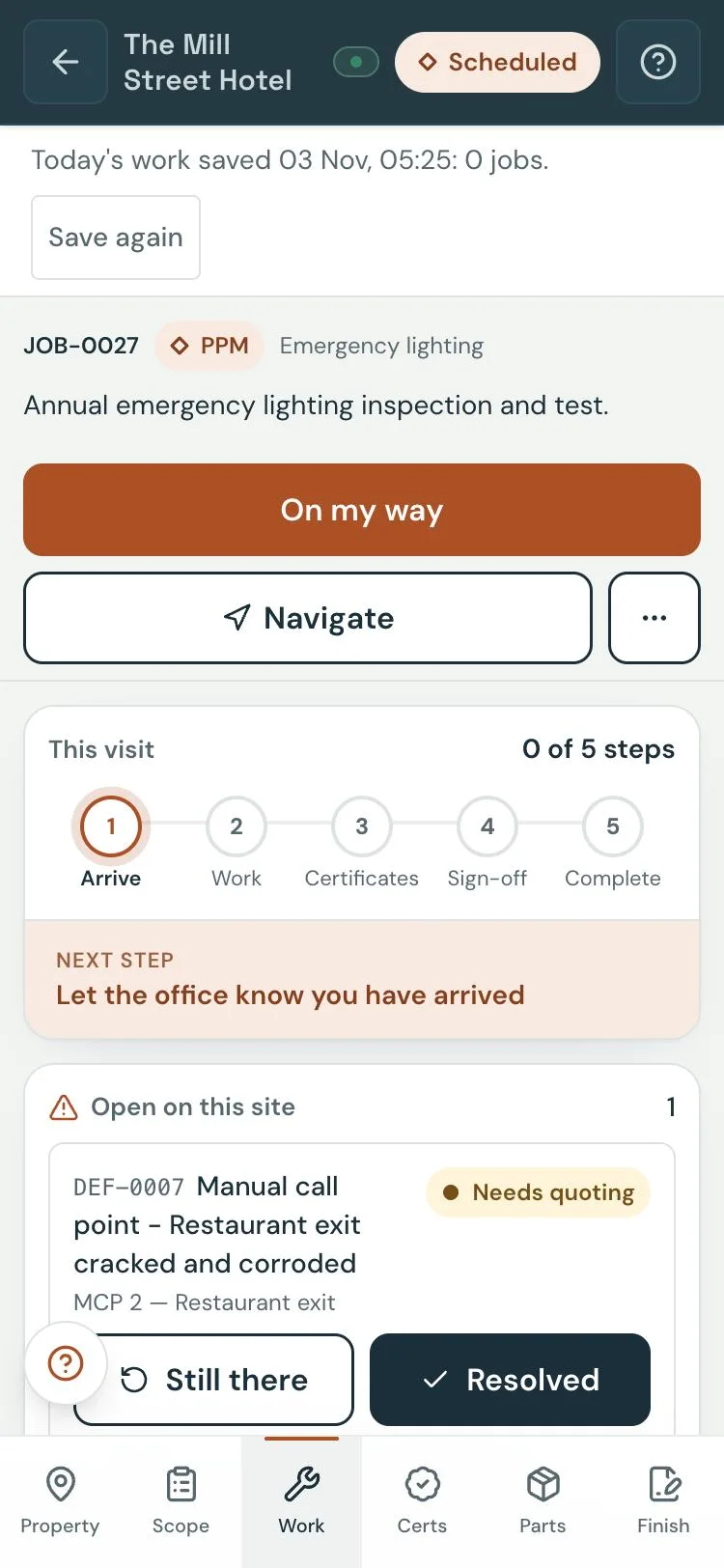
5. Defect logged on site A failed manual call point is a defect with a Needs quoting status, shown on the job for the next engineer and the office.
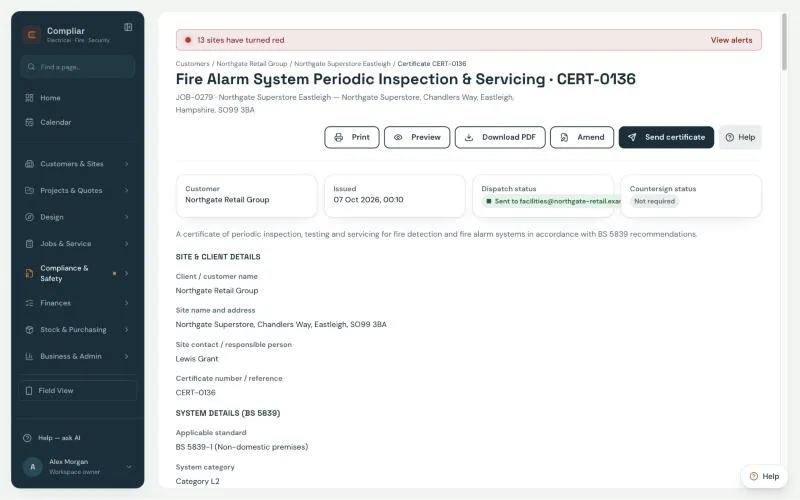
Compliar issued fire alarm system periodic inspection and servicing certificate on sample data, laid out to BS 5839-1, with print, preview, download, amend and send buttons
6. Certificate issued against the site The periodic inspection and servicing certificate, laid out to BS 5839-1, issued from the visit and held against the site. Once issued it cannot be deleted; an amendment needs a reason and makes a new revision.
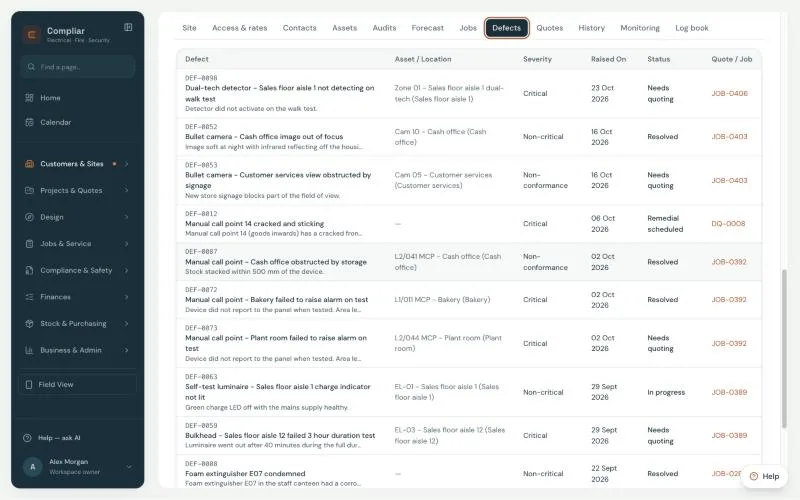
Compliar site defects tab on sample data listing defects with asset and location, severity, status such as Needs quoting or Resolved, and the linked quote or job
7. Defects to quotes Every defect found on a visit sits on the site with its severity, status and the quote or job it went to. The office ticks the ones to quote and raises a defect quote without re-typing.
Compliar invoicing hub on sample data with amounts to raise, send and chase, and a list of completed jobs waiting to be invoiced
8. Invoice raised One place for whoever does the invoicing: everything to raise, send and chase, with Xero taking the invoice once the link is connected.

All screens show sample data. With a Design seat, the zone plan and as-fitted drawing for the handover pack are exported from the same job; see Fire Detection and Alarm Design.

Compliance is the foundation

Every certificate is laid out to the standard it belongs to.

The job management sits on top of a certificate system, not the other way round. The templates follow the layout of the standards, so the fields an auditor or a customer looks for are where they expect them.

Fire detection and alarm systemsBS 5839-1 · BS 5839-6

Non-domestic to BS 5839-1 and domestic to BS 5839-6: commissioning, servicing and modification records, with the battery capacity section on the servicing certificate.

Emergency lightingBS 5266-1

Periodic inspection and discharge test records, fitting by fitting, and completion certificates.

Electrical installationsBS 7671:2018+A4:2026

EIC, EICR and minor works, with circuit schedules and observations.

Intruder and hold-up alarm systemsBS EN 50131

Commissioning and maintenance records for graded systems.

CCTVBS EN 62676

Commissioning and maintenance records for video surveillance systems.

Over 100 certificate and form templates across fire protection and life safety, electrical and security. Compliar keeps the records; your competent engineers and your scheme remain responsible for the work and for the certificates issued. See every template →

Four things an auditor will notice

  • Issued certificates can never be deleted Every edit to an issued certificate needs a reason, and the reason is logged in the job's event log with who made it and when.
  • Every device is an asset with its own test history Each detector, luminaire, camera and circuit is a record on the site, so the last result and the one before it are a tap away.
  • Each site shows red, amber or green from real records The colour comes from failed assets, open defects and overdue maintenance, not from a tick box. Your office is alerted when a site turns red, and your customers see the same status on their portal map.
  • Instruments fill in on the certificate The equipment register holds each tester with its serial number, calibration date and who holds it. The engineer's instruments fill in on the certificate, and calibration due dates are tracked.
Talk to the person who built it

I still run a fire and security team. That is why Compliar works the way it does.

I'm Keiran Sandham. I have worked in the electrical, fire and security industry for 20 years, and I still do, as a Fire and Security Manager with engineers on the road every day. I built Compliar because the tools we had covered one piece each and the paperwork fell between them.

I run every demo and every onboarding myself. If something in the app is wrong for how your company works, you tell me and I fix it.

Keiran Sandham, founder of Compliar
Keiran Sandham Founder of Compliar · Fire and Security Manager · 20 years in the electrical, fire and security industry Read the full Compliar story →
  • No per-certificate fees Certificates come with every seat, from Lite up. You pay per seat per month, not per certificate.
  • No contract Monthly or yearly, and you are free to leave. Early adopters keep their price for three years.
  • Your records stay yours Export every table to CSV whenever you like, and bring legacy certificates in as PDFs and photos against the site.
Digital QR log book and stickers

A QR sticker on the panel replaces the paper log book.

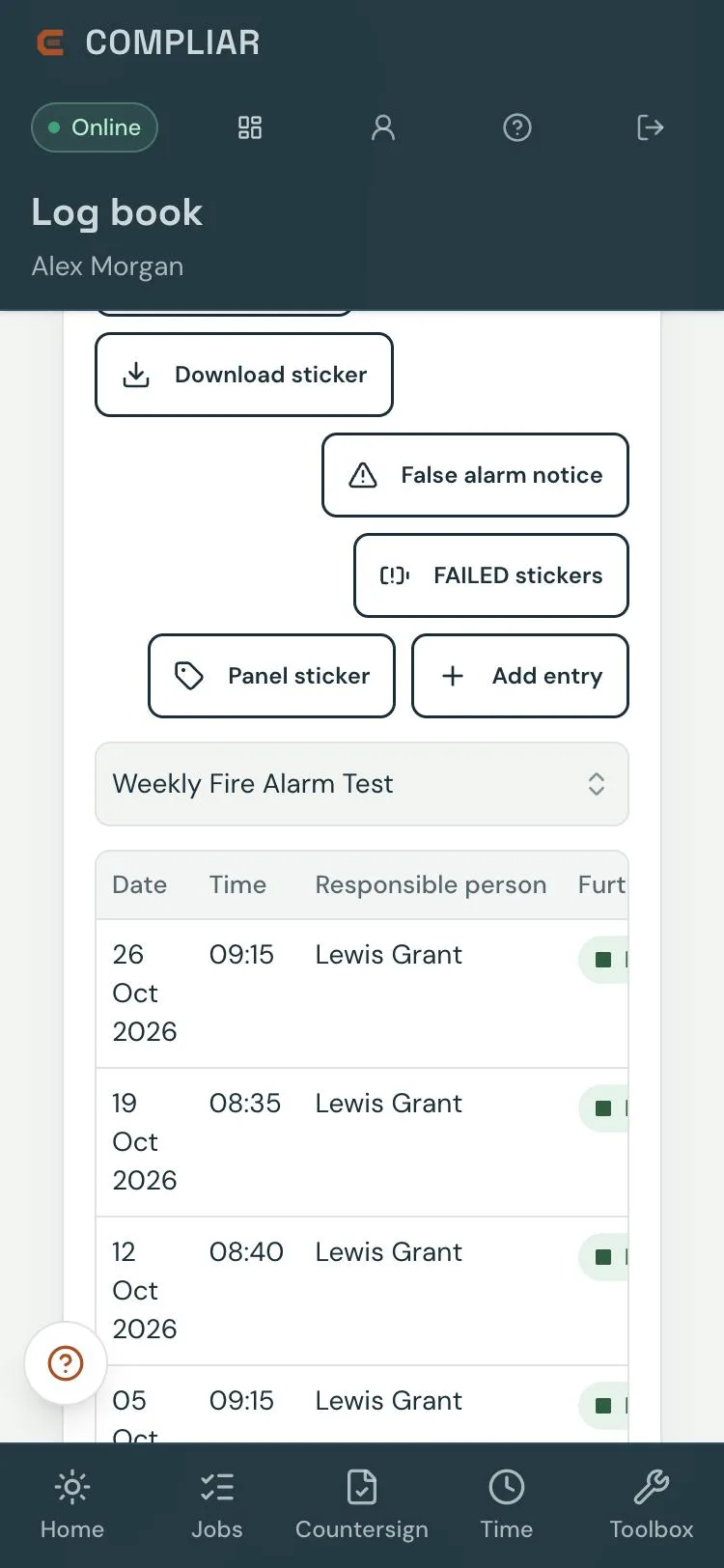
The site contact scans the sticker, signs in and logs the weekly fire alarm test from the phone. Thirteen record types, from weekly tests and false alarms to building alterations and fire risk assessments, are kept against the site. Missed tests send an email to the contacts you set, and a link on the log book requests a call-out.

Compliar site log book on a phone, sample data: QR sticker and label controls, false alarm notice, FAILED stickers and panel sticker buttons, Add entry, and the weekly fire alarm test log with date, time, responsible person and further action
The log book on the phone The weekly test log with date, time, who did it and whether further action is needed. The QR sticker, false alarm notice, FAILED stickers and panel sticker print from the same screen.
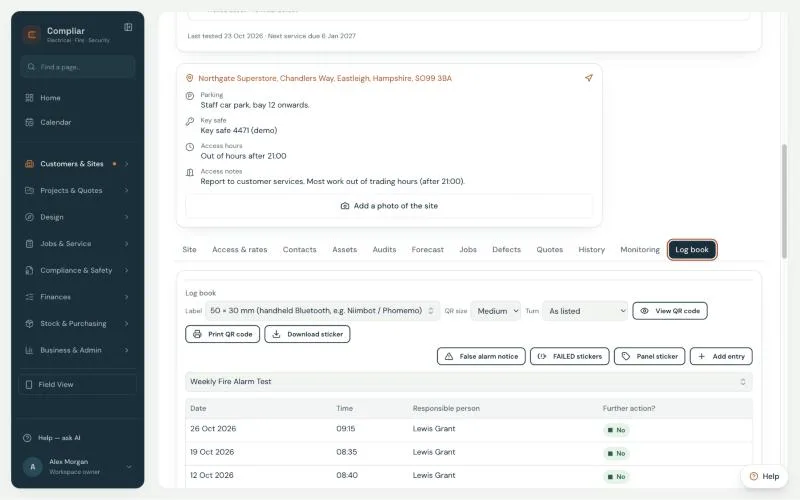
Compliar site page Log book tab on sample data, with label size and QR size controls, sticker buttons and the weekly fire alarm test log
The same log book from the office Every site has a Log book tab beside its assets, jobs, defects and history, with the routine tests and missed-test alerts underneath.
  • £4 + VAT per site per year Add log books to any plan, or charge your maintenance customers for them at your own price. A log-book-only account is available for anyone who holds sites.
  • Stickers £1 + VAT each QR log book tags in white or your brand colour, false alarm notices and front-of-panel service stickers, posted for £3.95 + VAT per order. Or print them yourself on the label printer you already have.
Pricing · No contract

Three seat types. Mix them across the van and the office.

Certificates, the offline field app, the customer portal and the Sticker Studio are included with every seat. Pay yearly and two months are free.

Field Engineer Seat

Lite

£35+ VAT / seat / month

For engineers completing service visits, asset testing, RAMS sign-off and certificates on site.

  • Offline field app in the phone's browser
  • Over 100 certificate and form templates
  • Defects raised on site go straight into a quote; RAMS and timesheets included
  • Printable QR asset tags; scan to open the asset
Project & Design Engineers

Design

£95+ VAT / seat / month

Everything in Office plus the Design editor for drawings, symbols, cable runs and take-offs.

  • Everything in Office
  • Zone plans and as-fitted drawings, exported to PDF
  • Cable runs and symbols
  • Take-offs into the bill of quantities
Digital QR log books £4 + VAT per site per year

Stickers £1 + VAT each, plus £3.95 + VAT postage per order, or print labels yourself. Onboarding is from £195, quoted individually.

Full pricing and seat calculator → Book a demo with Keiran
Early adopters

Book a demo. Keep your price for three years.

Companies that join in the first 12 months after launch keep their seat prices for three years. No contract and no per-certificate fees. Fill in the form and Keiran will email you to arrange a walkthrough on your own disciplines. How the early-adopter offer works →

Over 100 Templates · 32 System Types

All Certificates & Templates by Discipline

The list below is a summary of the template groups. Templates reference the standards shown; the engineer and scheme remain responsible. Filter by keyword:

Fire protection and life safety

  • Fire detection and alarm systems (non-domestic) – commissioning, servicing and modification BS 5839-1
  • Fire detection and alarm systems (domestic) – installation and periodic inspection BS 5839-6
  • Voice alarm and evacuation alert systems – periodic servicing BS 5839-8 · BS 8629
  • False alarm management – investigation records
  • Emergency lighting – periodic inspection and discharge test BS 5266-1 · BS EN 50172
  • Emergency lighting – completion and commissioning BS 5266-1
  • Fire extinguishers and blankets – commissioning and annual service BS 5306-3 · BS EN 1869
  • Fire doors – inspection BS 8214
  • Dampers, risers, hydrants and smoke ventilation – test records BS 9990 · BS 750 · BS 7346-8
  • Sprinklers, pumps, gas and kitchen suppression – service records BS 9251 · BS EN 12845

Electrical

  • EIC – Electrical Installation Certificate BS 7671:2018+A4:2026
  • EICR – Electrical Installation Condition Report BS 7671:2018+A4:2026
  • Minor electrical installation works certificate BS 7671:2018+A4:2026
  • PAT – in-service inspection and testing of electrical equipment IET Code of Practice
  • EV charging – installation records BS 7671 Section 722

Security systems

  • CCTV – commissioning and maintenance BS EN 62676
  • Intruder and hold-up alarm systems – commissioning and maintenance BS EN 50131 / PD 6662
  • Access control and door entry – controllers, readers and releases BS EN 60839-11
  • Gates, barriers and automatic doors – safety checks BS EN 12453 · BS EN 16005
  • Alarm signalling and nurse call – service records
Want to see a certificate for your trade? Ask for it in the demo →