Full fire protection and life safety, security and electrical workflows.
Design and price the work, carry out FRAs, prepare RAMS, then
install, test and commission. Bring certificates, reports,
maintenance and QR fire log books together.
See it working.
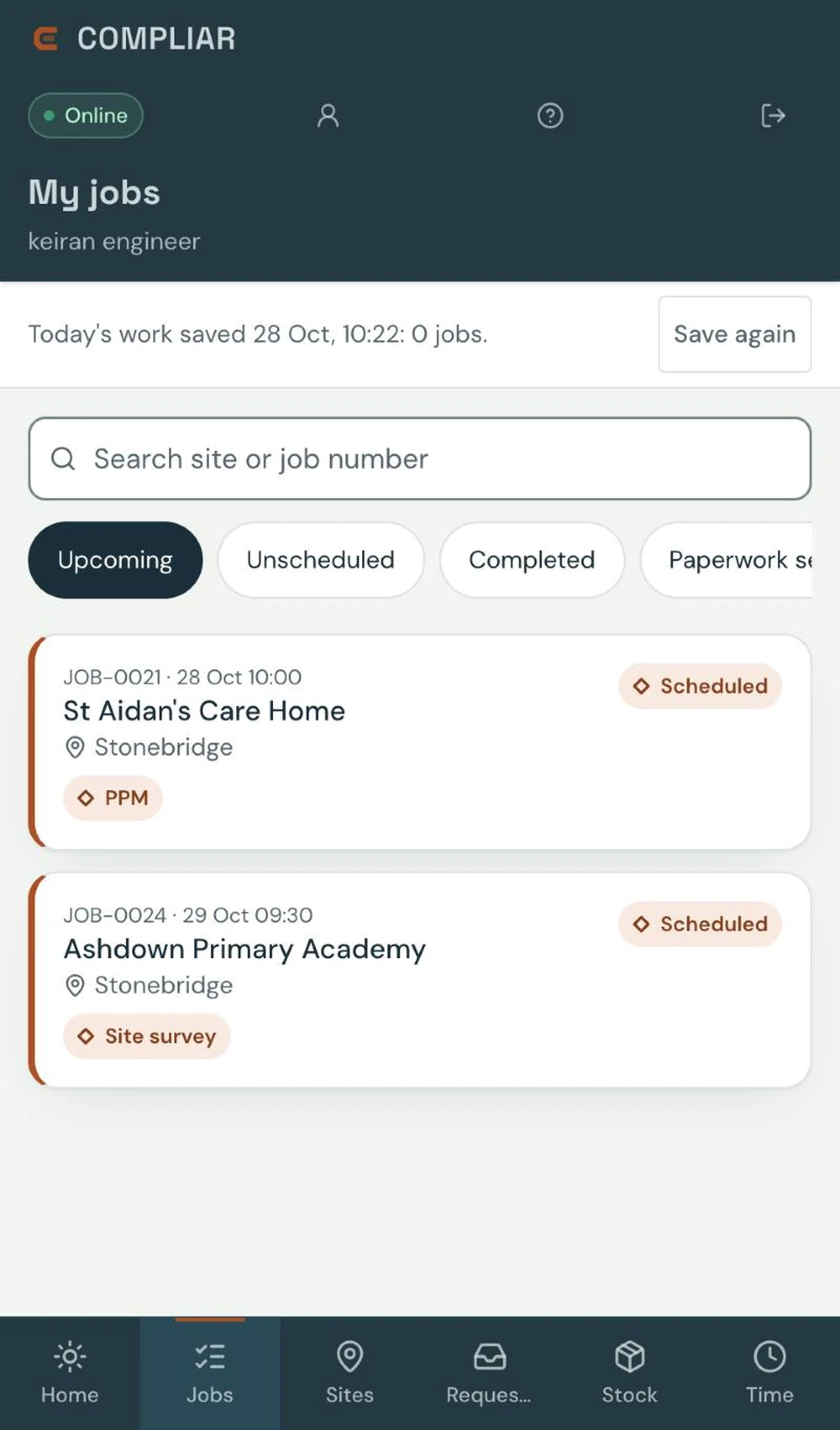
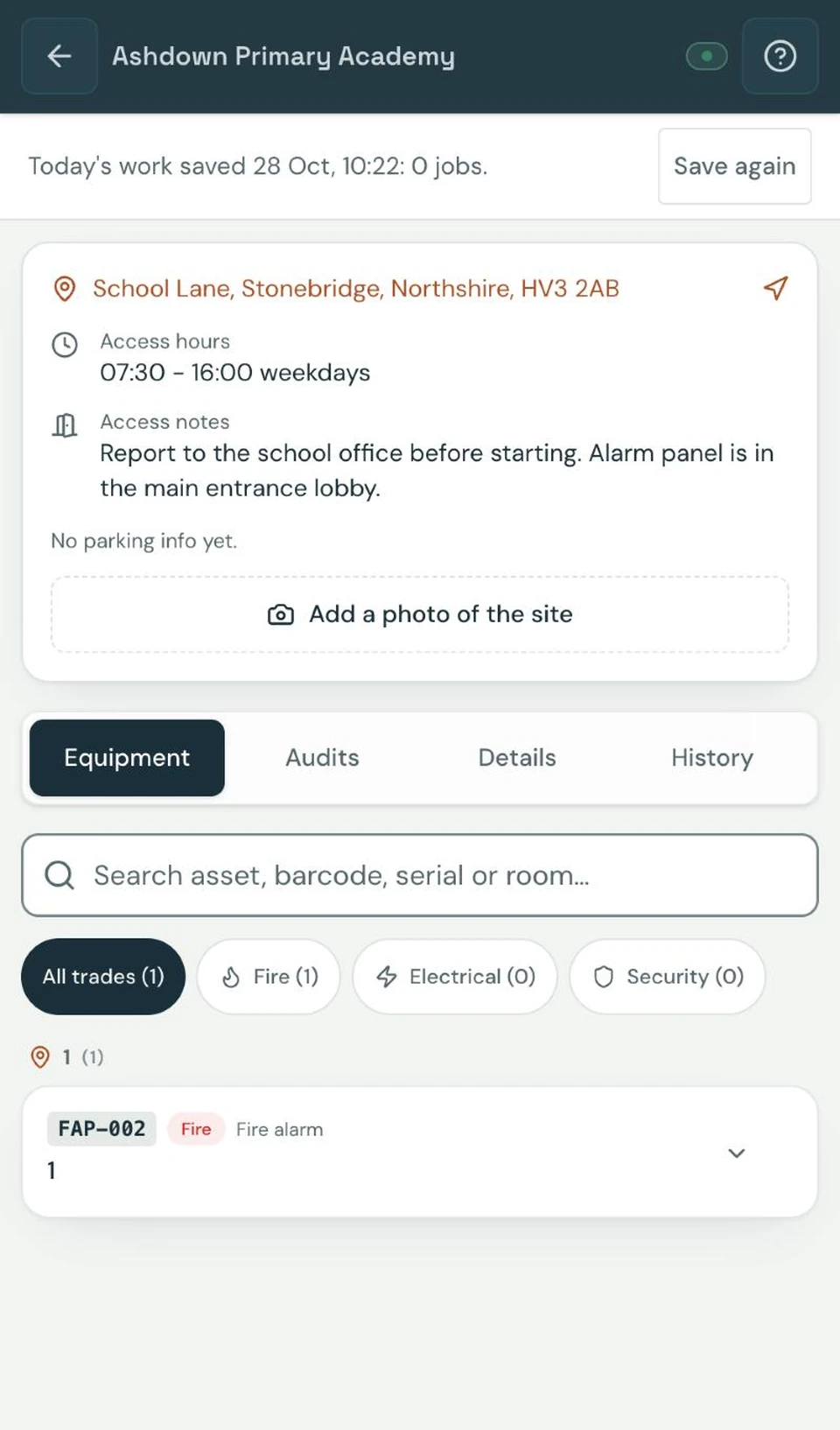
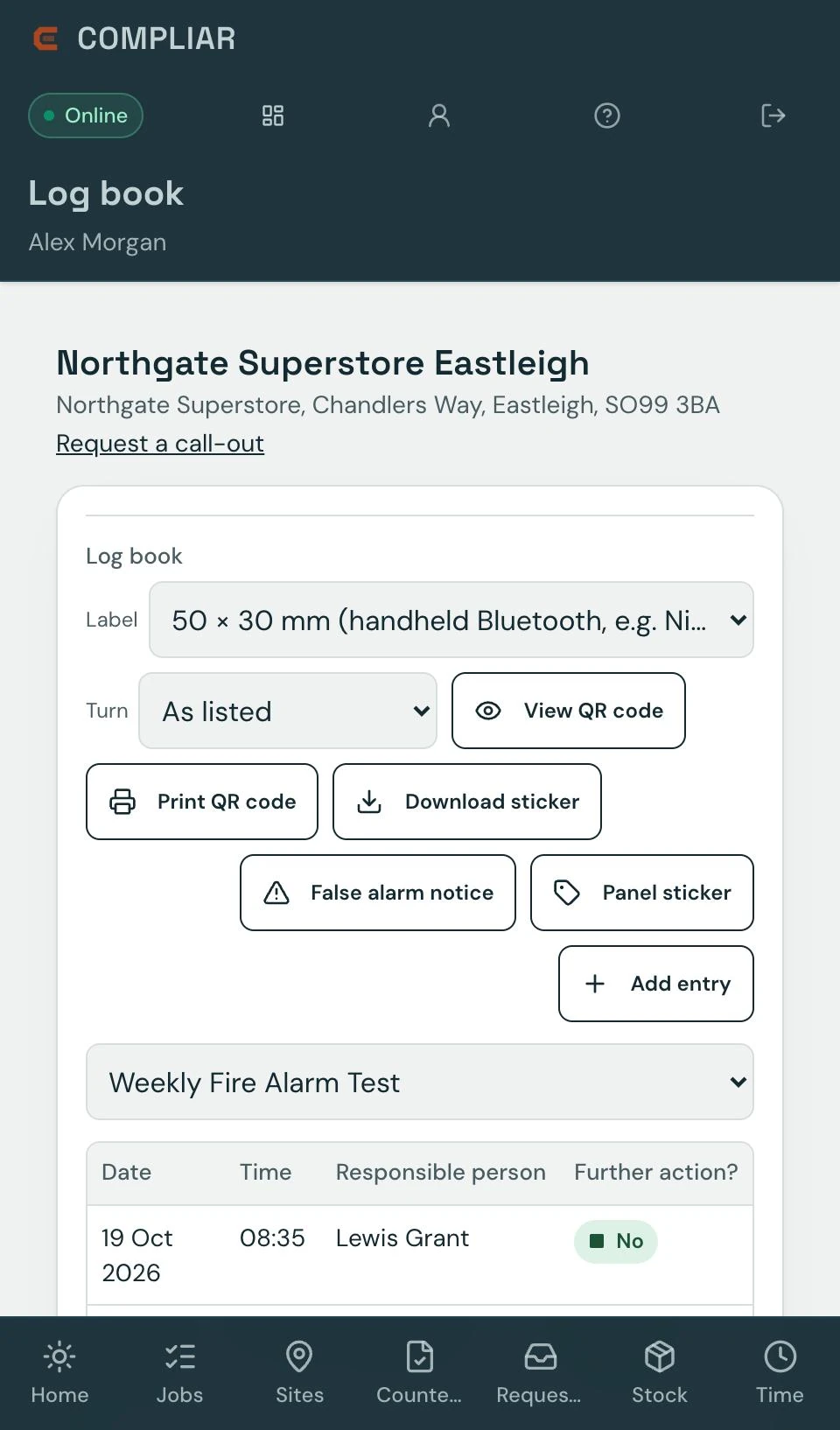
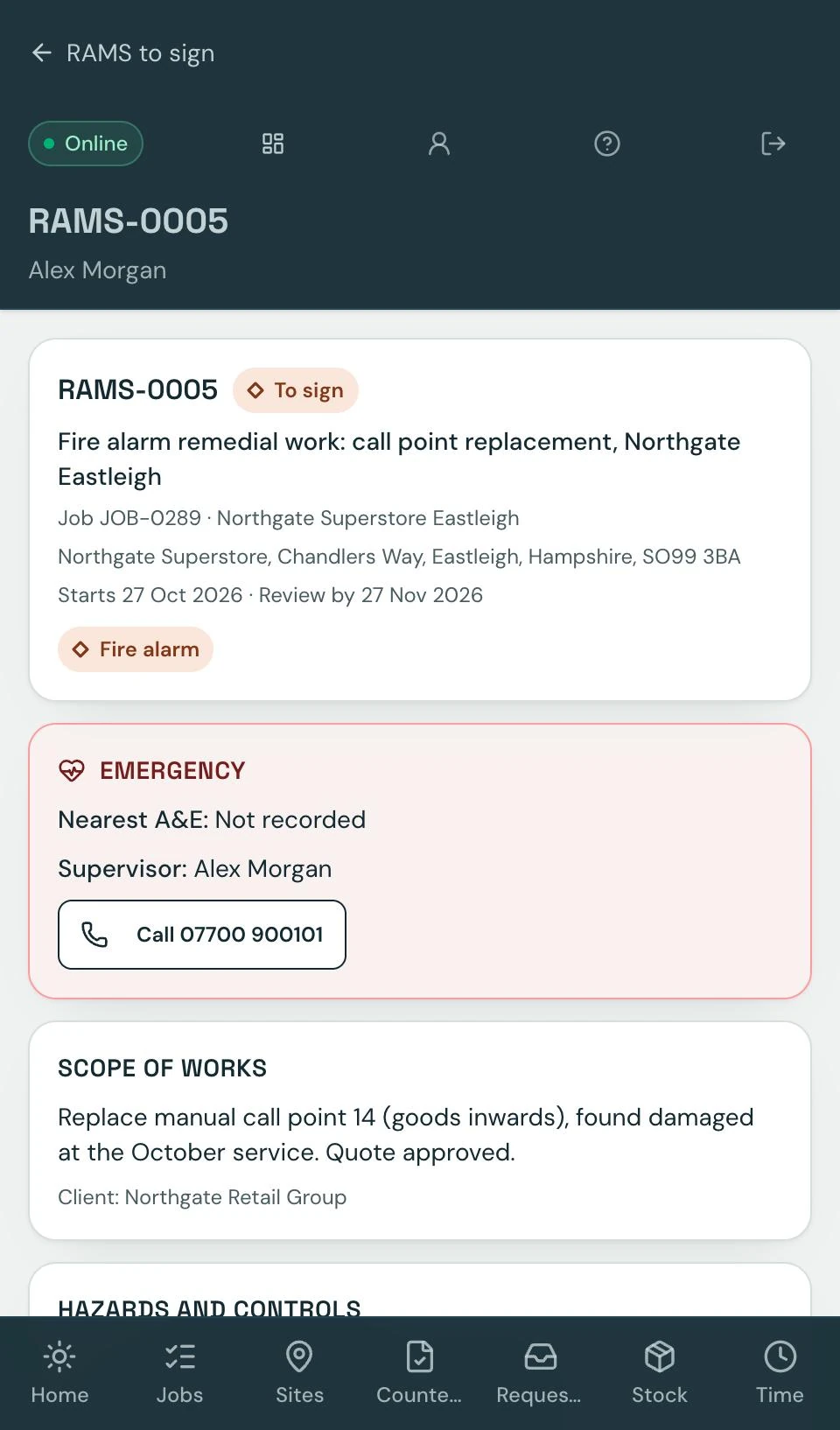
Real screens from Compliar, using example customers and sites. Tap any screen to see it full size.
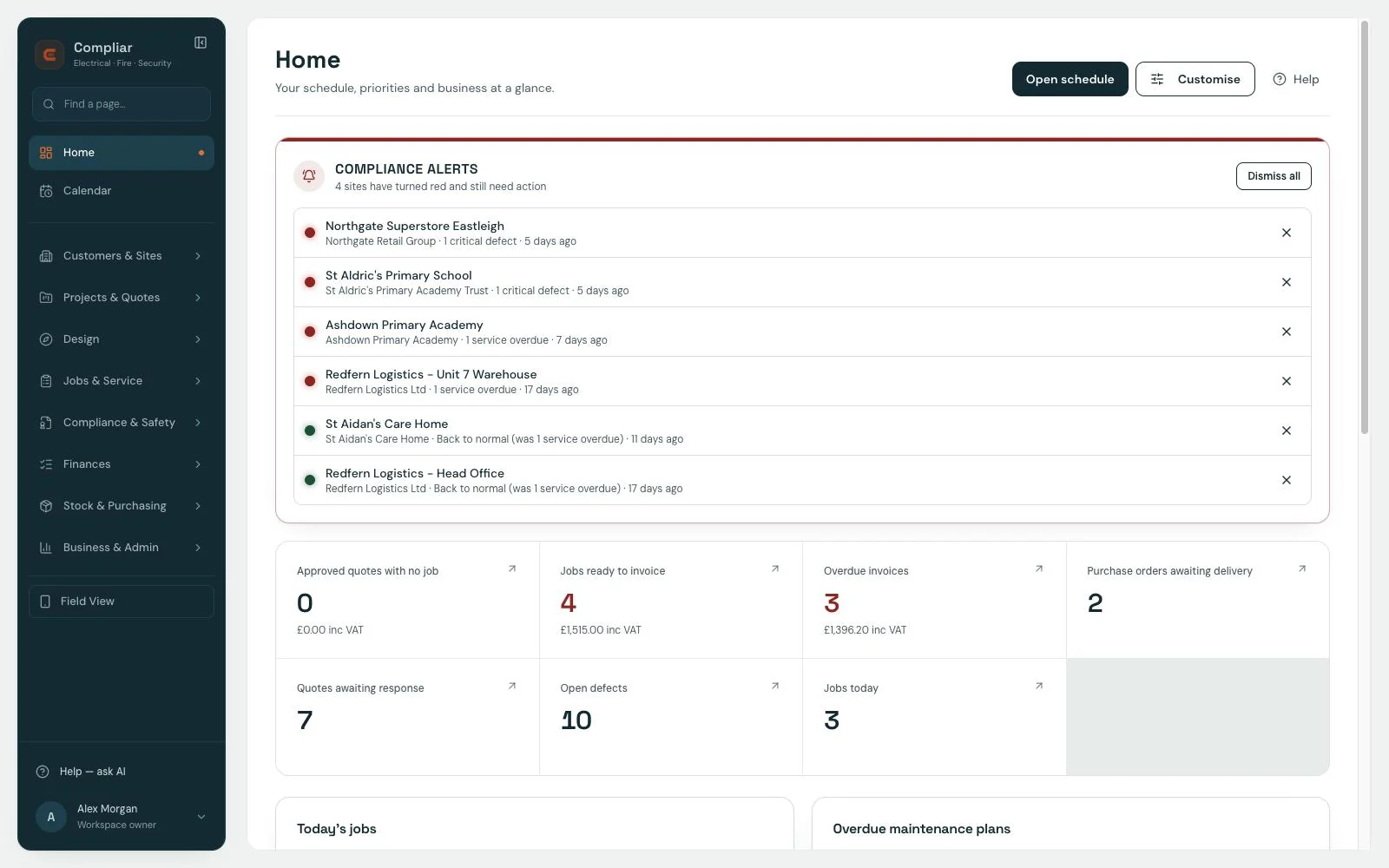
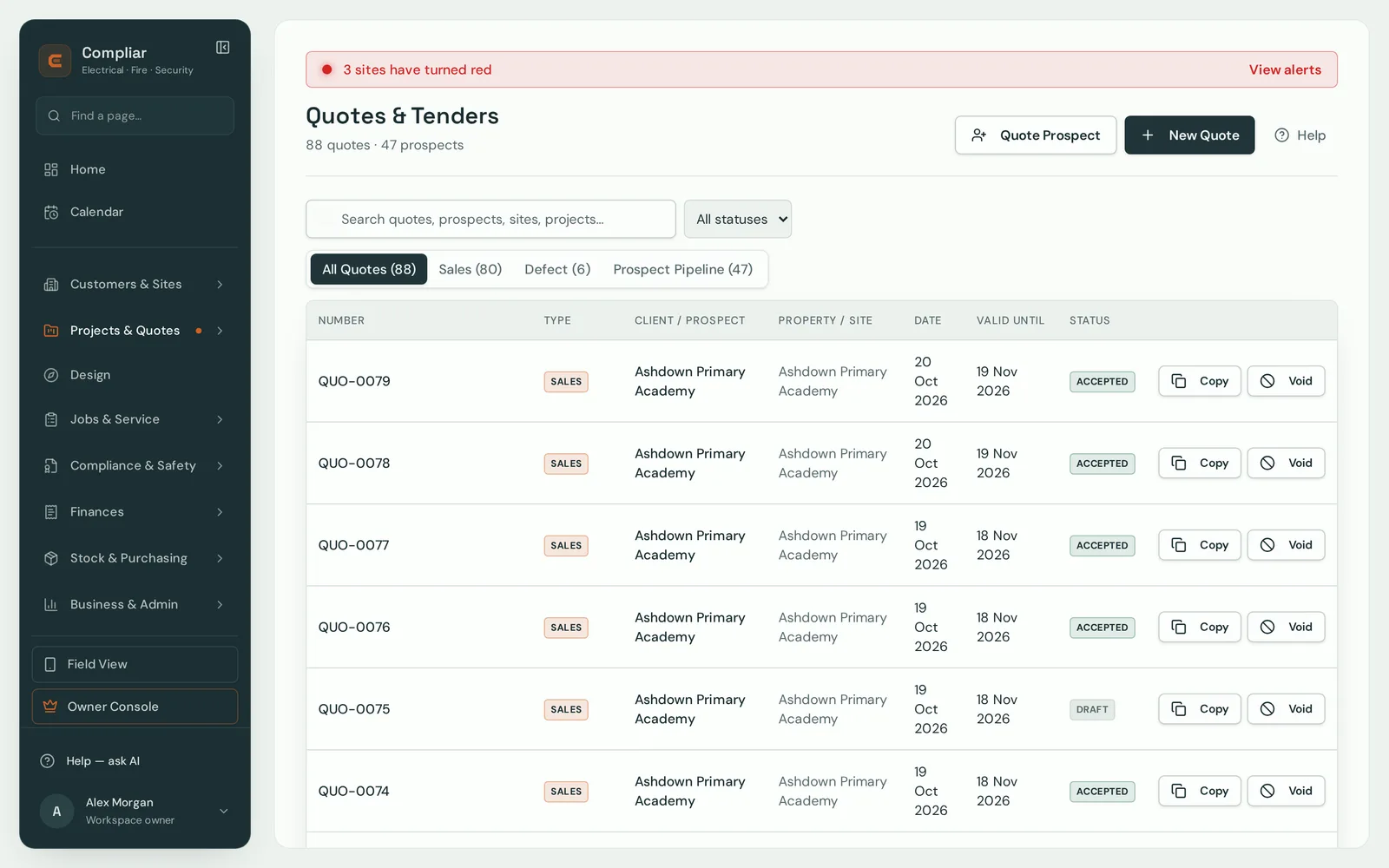
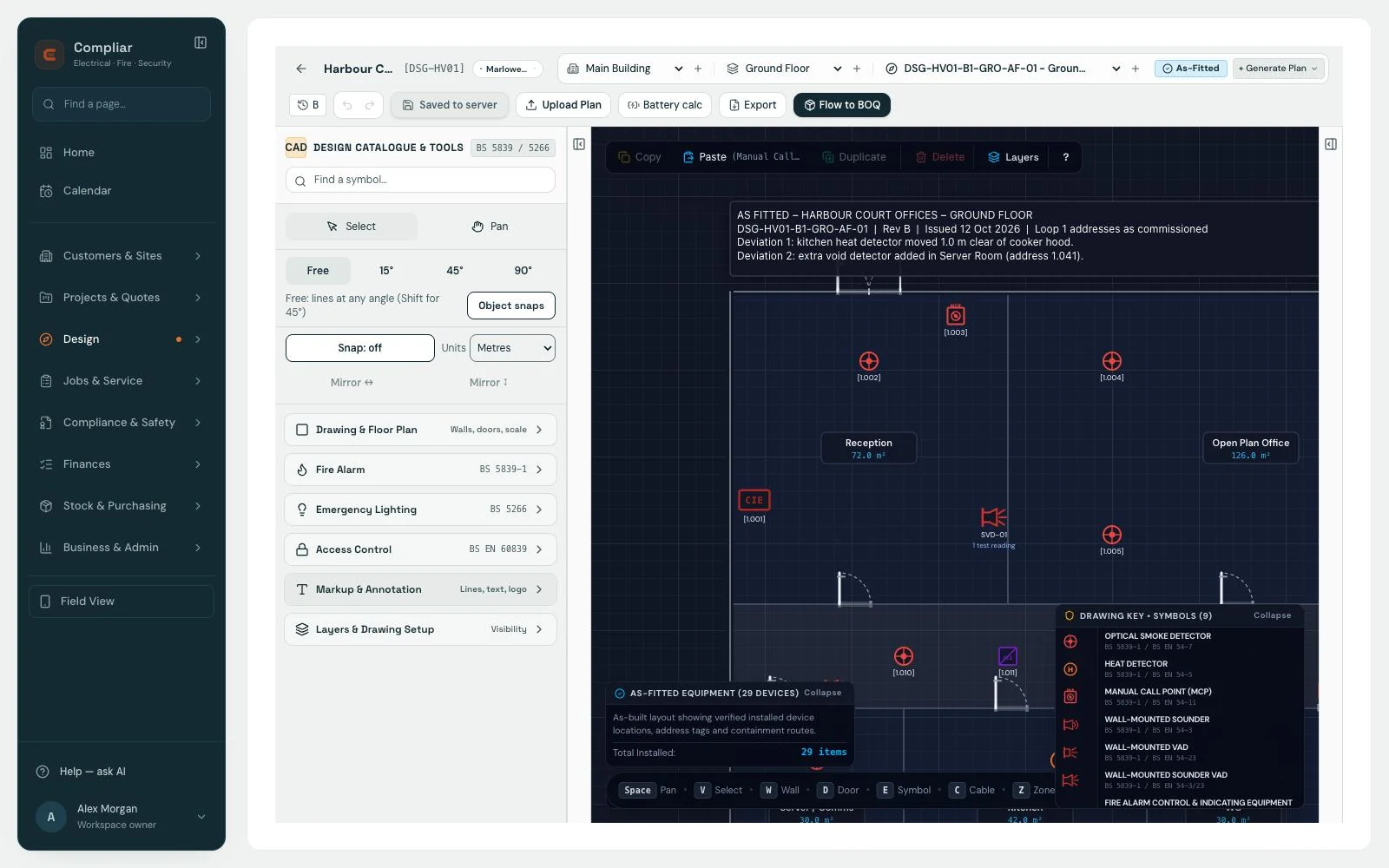
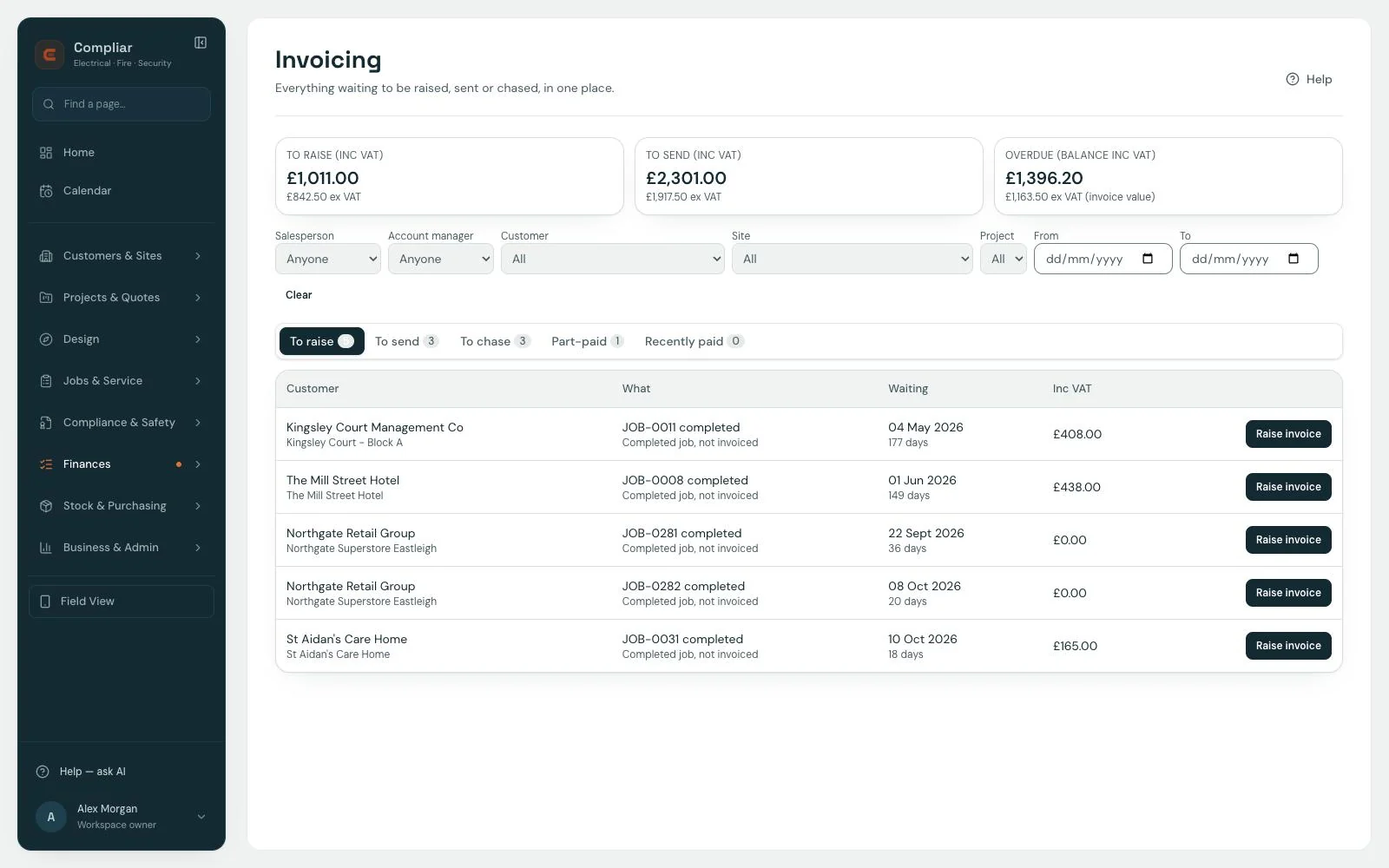
Home: what needs action today, at a glance.Quotes and tenders, with every status in one list.Design: as-fitted drawings with a live symbol key.Invoicing: everything to raise, send and chase in one place.
Field view: the jobs for the day.Site details: access, notes and equipment.Log book: QR stickers and weekly test records.RAMS: read and sign on the phone.
THREE TRADES. THE WHOLE JOB.
Your full range of work, in one workspace.
Design, price, install, test, commission, hand over and maintain.
Keep the certificates, reports and site history with the work.
Fire protection and life safety
From risk assessment to ongoing protection.
Fire detection and alarm systems
Aspirating detection
Portable extinguishers
Emergency lighting
Fire risk assessments (FRAs)
Dry and wet risers
Domestic sprinklers
Commercial sprinklers
Private hydrants
Gas suppression
Kitchen suppression
Evacuation alert systems
Fire doors
Fire dampers
Hose reels
Smoke ventilation
Fire pumps
Fire blankets
Voice alarm systems
Emergency voice communication
Nurse call
32 system types across three disciplines, each with its own certificate templates.
Installation, commissioning and maintenance records,
certificates, reports and fire log books.
Create CAD drawings, take off quantities and price the work from
those quantities. Take-offs and CAD drawings are
included with Design.
What’s included
Office seats include projects, tenders and pricing from your
quantities. Design seats include everything in Office, plus
take-offs, CAD drawings, zone plans, as-fitted plans, wiring
diagrams and schematics for your installation and handover
records.
CAD drawings for design and installation records
Take-offs and pricing from your quantities, on Design
Zone plans, as-fitted plans, wiring and schematics
Symbol sets for fire, power, lighting, CCTV, access, intruder, extinguishers and data
Staircases and landings drawn to scale, internal and external
Measure distances and cable runs from the drawing scale, and keep them as dimension lines
Turn the take-off into a quote
Import supplier price lists with brand, protocol and device type
Keep a digital fire log book within Compliar. Give ongoing
site records a home alongside certificates, defects and
equipment. Print a user-customised QR label for the site so
your team can find its logbook.
What’s included
Enable a digital logbook for the site, with 13 record
categories (including weekly alarm tests, emergency lighting
tests, false alarms, fire drills and fire doors), kept by your team in the app so the record
remains useful after the job is handed over. Create a
customised QR label and print it for display at the site;
your team scan it, sign in and open that site’s logbook.
Fire log books within the app, £4 + VAT per site per year
(added to any plan, or as a log book only account with no seats, for any business that looks after several properties; UK only, working to British Standards)
Site-based records in 13 categories
User-customised, printable QR labels for the site’s logbook
Kept by your team in the app; not part of the customer portal
RAMS
Plan safer work for everyone on site.
Build risk assessments and method statements around the job. Set
out hazards and working methods to help protect engineers,
clients and others on site.
What’s included
Create a RAMS straight from a job and it pulls in hazards and
a method statement from ready-made templates covering every
discipline Compliar supports — or start from a blank RAMS for
anything bespoke. Review and adapt the hazards and methods to
the actual site and task, then sign off and issue as a PDF.
RAMS is included on every seat.
Task-linked creation, auto-populated from the site and job
Ready-made templates across every discipline, or build one
from scratch
Editable hazards, electronic sign-off and a printable PDF
Scheduling
See every maintenance visit before it's due
Plan maintenance visits by property, see the whole schedule and
reassign work as plans change.
What’s included
Day, week and month views of every maintenance plan, tied to
the property it's scheduled against — so a visit never quietly
slips past its service interval.
Maintenance visits scheduled per property, not per
technician's memory
Combined calendar for both office planning and field work
Reschedule and reassign without leaving the job
Trades & disciplines
Only the trades and disciplines you actually do
Fire protection and life safety, security and electrical. Cover the
full job: design, pricing, installation, testing, commissioning,
handover and maintenance. Choose your disciplines to keep
irrelevant forms and equipment out of your team’s way.
What’s included
Tell Compliar which trades you cover — fire protection and
life safety, electrical, security — then switch whole trades or single
disciplines on and off, and drop the job types you don't
service, such as aspirating, risers or suppression. Compliar hides the forms,
job templates and equipment options that don't apply, on the
desk and in the field.
Switch each trade on or off for your company
Switch whole trades or single disciplines on and off,
along with the lines of work you don't run
One-click presets, such as core systems only, to get
started fast
Fire risk assessments
FRAs are part of the workspace.
Carry out fire risk assessments with built-in risk scoring
(scored from likelihood and consequence). Keep
assessments and reports alongside the site’s certificates,
defects and fire protection and life safety records.
Bring the assessment, remedial work and ongoing maintenance into
the same workflow, with RAMS for planning the work safely.
Certificates & reports
The paperwork for every trade. Connected to the job.
Complete installation, commissioning, inspection, testing and
maintenance certificates and reports for every discipline we
support, across fire, security and electrical. Built-in
calculations, site records and your own templates keep the
details together.
What’s included
Certificates and reports for every system type we support —
32 across fire protection and life safety, security and
electrical, from fire detection and alarm systems and emergency
lighting to CCTV, door entry, EICRs, PAT testing and EV charge
points. The full list is under
Certificates & standards. It also includes
two built-in calculators most platforms leave to a separate
spreadsheet: BS 5839-1:2025 Annex E battery sizing, available
when you build or edit a template, and fire risk scoring.
Build and edit your own certificate templates — no waiting
on anyone else (Office seats and above)
Fire-risk scoring calculated as you fill the form, and a
BS 5839-1 Annex E battery calculator you can add when
building or editing a template
Clean, read-only print view and a full issued-certificate
history
Site compliance
Every site, red, amber or green — at a glance
See which sites need attention, with status based on failed
assets, open defects and overdue maintenance.
What’s included
Compliar scores each site from its real records — failed
assets, open defects and maintenance plans past due — and
takes the worst of its systems. The colour shows on the
dashboard, the sites list and every customer, and your office
team gets an in-app alert when a site turns red.
Red for failed assets, critical defects or overdue
servicing; amber for other open defects or servicing due
within 30 days
A customer's colour is the worst of its active sites, with
the sites that need attention listed first
Scored from the work your engineers actually record — no
separate spreadsheet to keep up to date
Quotes & invoices
Sales work and defects, kept separate
Keep sales quotes and remedial work organised, then move from
accepted work to invoicing.
What’s included
New business and remedial work found on a maintenance visit
run through two distinct quote types, each with its own
numbering sequence — so your win-rate reporting on one doesn't
get muddied by the other. Every quote, invoice and certificate
dispatches as a real branded email with the PDF attached — not
a pre-filled draft you have to send yourself.
Sales quotes and defect quotes, tracked and numbered
separately
Real email dispatch straight from the job, PDF attached
automatically
Company bank details and terms pulled in automatically
Quotes and defect quotes start on a Lite seat; invoicing
and credit control are on Office seats and up, along with
recurring contract invoices, deposits, progress claims, CIS
and retention
Xero integration
Invoices and payments, linked with Xero
Compliar links with Xero in both directions, so you don't type
invoices or payments in twice.
What’s included
Connect your Xero organisation from Settings. Send an invoice
in Compliar and it is created in Xero, matched to the
customer's Xero contact (or a new contact if there is none). When a payment is recorded in Xero, the Compliar
invoice is marked paid or part paid. Payments come back automatically, and Sync now brings them in straight away.
Sending an invoice creates it in Xero, with the customer's contact matched or created
Payments recorded in Xero mark the Compliar invoice paid or part paid, automatically
Invoices already in Xero are locked in Compliar: edit them in Xero or raise a credit note
Connected per company, from Settings
Handover packs
A proper handover. A clearer record.
Bring the handover story together: certificates, zone plans and
as-fitted drawings that show the customer what was installed.
What’s included
Drawings on Design seats cover zone plans, as-fitted plans,
wiring and schematics for your handover documentation. Every
job also carries its own documents card: the job report, an
asset report, each certificate, every quote and every invoice,
all as branded PDFs. View or download any of them, tick the
ones you want to send and email just those — Compliar keeps
track of what has gone out.
View or download any document in one click, straight from
the job
Tick what to send — only those are emailed and marked as
sent
A sent / not sent marker on every document, so nothing is
chased twice or forgotten
Field app
Everything a technician needs, on site
Record time, parts, notes and certificates from your phone. The
field app keeps working with no signal once your jobs have loaded
on the phone, and sends your changes when you are back in range.
What’s included
A travelling → on-site status with its own timer, one-tap
directions to the next stop, parts used, billable line items,
a required-certificate checklist and technician notes — one
simplified mobile view, with none of the admin clutter of the
desk side.
Travelling / on-site status with an automatic timer, plus
one-tap directions
Parts used and billable items logged from the van
Required-certificate checklist, so nothing's forgotten
before sign-off
Engineers see the full job and site history, and only the quotes they raised or are assigned to; or limit them to their assigned jobs
Defects
From failed asset to fixed, without re-typing
Turn a failed asset into a defect, quote and follow-up job
without entering the same details again.
What’s included
Fail an asset on site and the defect is raised against it.
Pick the wording from your own library of remarks, apply the
same remark to every selected asset in one go, then turn the
defects into a quote in a click and see at a glance which
still need one, which are quoted and which are resolved.
A remark library you control, so the same fault reads the
same way on every report
Apply one remark to many assets at once
Quote the selected defects in one click, linked back to the
asset that failed
Suggest a quote straight from a failed asset test, with parts marked for the quote or charged on the visit
Part suggestions match the device type, brand and protocol being replaced
Job costing
Know what every job really earned
Track labour, parts and revenue to see what each job costs and
the margin it earns.
What’s included
Log labour on the job from the desk or the phone, billable or
not, with a cost rate and a charge rate for each engineer.
Every job shows its sell revenue against labour and materials
cost, with gross profit and margin worked out as you go.
Cost and charge rates per person, set once in Settings
Parts used on the job costed from your own stock prices
Margin shown on every job, colour-coded, so thin ones stand
out
Projects & tenders
Price a whole project, area by area
With an Office seat, build project estimates by area, with
parts, labour, waste and your target margin. Add take-offs from
your drawings with a Design seat.
What’s included
Start a project from a prospect or an existing customer site,
break it into floors and areas, and build the bill of
quantities line by line — parts, labour hours and waste — at
your target margin. Cost, sell, margin and VAT update as you
build it.
Projects are numbered and kept apart from your day-to-day
jobs
Areas seeded from a template, then edited to suit the
building
Parts and labour priced from your own rates, with live
margin
Assets, stock & settings
The record of what's actually installed
Keep equipment records and stock organised, with an asset
register for each property.
What’s included
A per-property asset register, parts and warehouse stock
levels, purchase orders dispatched straight to suppliers, and
company-wide settings for branding, document numbering and
terms — the groundwork every other part of Compliar relies on.
Full equipment register per property, in your own asset
types with codes like FAP-001
Parts, warehouses and live stock levels
Purchase orders, dispatched to suppliers with a real PDF
attached
The asset register starts on a Lite seat; stock and
purchase orders are on Office seats and up
Reporting & insights
What's due, what's overdue, and where the revenue is
See maintenance status, outstanding invoices and revenue trends
without building another spreadsheet.
What’s included
Compliance status and data-quality checks across your whole
customer base, plus a financial view (on Office seats and
up) — revenue trend, outstanding invoices and win rate —
without exporting anything to a spreadsheet first.
Compliance status — overdue, due-soon and on-track
maintenance plans, at a glance
Data-quality checks — properties with no maintenance plan,
no assets or no contract
Revenue trend, outstanding invoices and win rate (Office seats and up)
Customer portal
No more chasing PDFs by email
Give customers access to certificates, defects and equipment.
Invite a contact for the whole account or a single site.
What’s included
A customer login, with each contact invited for the
whole account or a single site, showing the customer their
certificates, open defects and live equipment.
Invite each contact for the whole account or a single site
Certificates, defects and equipment visible the moment
they're issued